AI reader for astrologers
A helper that writes a first draft from the facts the tool has already worked out for a chart. You read the draft, change what you disagree with, and decide what the client hears.
Included in every plan. No card needed. Sign in with Google to start.
Who it is for
An astrologer with a full diary uses it to save typing. A client asks about work, and you get a short draft to think over while the chart stays open. After the sitting, a five-part written reading is ready for you to edit, in place of a blank page.
It does not look at the sky and it does not make a chart of its own. It is given a numbered list of facts from the tool and told to use only those. Each answer shows which facts it leaned on, so you can check it against the chart in a few seconds.
What you can do with it
Ask about one chart
- Ask About This Chart is a full page, with the chat on one side and every fact the AI can see on the other.
- The Ask AI button in the tab bar opens the same chat in a side drawer, so you stay on the kundli page you are reading.
- Six ready questions to start: the main strengths, the current dasha, career, relationships, the yogas and the doshas.
- You can ask follow-up questions in the same chat, and stop an answer part way.
- On KP pages the chat also gets the cusps, sub lords and significators. On Western pages it gets the Western positions.
- Answers come in English or Hindi, following the language you set in the tool.
Draft a written reading
- Full AI Reading writes five parts: Personality, Career, Relationships, Current period and What to focus on.
- Every part opens as a text box, so you can change any word before printing.
- Save to client keeps the reading with that person. Open it again later to edit, print or delete it.
- The printed copy carries your name, the birth details, and a line saying it was prepared with an AI helper and reviewed by the astrologer.
- Tick Jain client and gemstones are left out of the reading.
Tarot, numbers, palm and Vastu
- Tarot reads a spread you saved on the reading table, card by card in its position.
- Numerology writes from a date of birth, and from a name if you give one.
- Palm writes only from the observations you type, one point on each line. It adds nothing you did not see.
- Vastu sums up a saved check into what already works and what could improve, with simple low-cost steps and no building work.
Check what it wrote
- The facts list is grouped into sections such as Planets, Houses, Dasha, Yogas, Doshas, Ashtakavarga and Transits today.
- Each answer ends with Facts used. Open it to read the exact facts behind the answer.
- A reading part that breaks a rule of the tool (harm, illness, a promised result, gemstones for a Jain client) is flagged for you to rewrite.
Use another AI if you prefer
- Copy kundli for AI puts a plain-text summary on the clipboard: birth details, ayanamsa, lagna, planets with nakshatra and pada, the running dasha, yogas, doshas and the navamsa.
- The name stays out of it unless you tick Include the name.
Privacy and fixed rules
- The client's name, phone, email and address are not sent. A last check searches the facts for those details and replaces them.
- Chats are held in memory only and are gone when you close the tool.
- Nothing you send to the AI reader is kept on our server after the answer comes back.
- The rules are fixed. It stays calm, gives no medical, legal or financial advice, and promises no result.
- You can open and read the exact instructions sent with every question.
- If a message mentions self-harm, the AI is not called and the screen shows Tele-MANAS 14416 instead.
See it in the tool
Real screens from the tool, made with sample charts. Select a screen to see it larger.
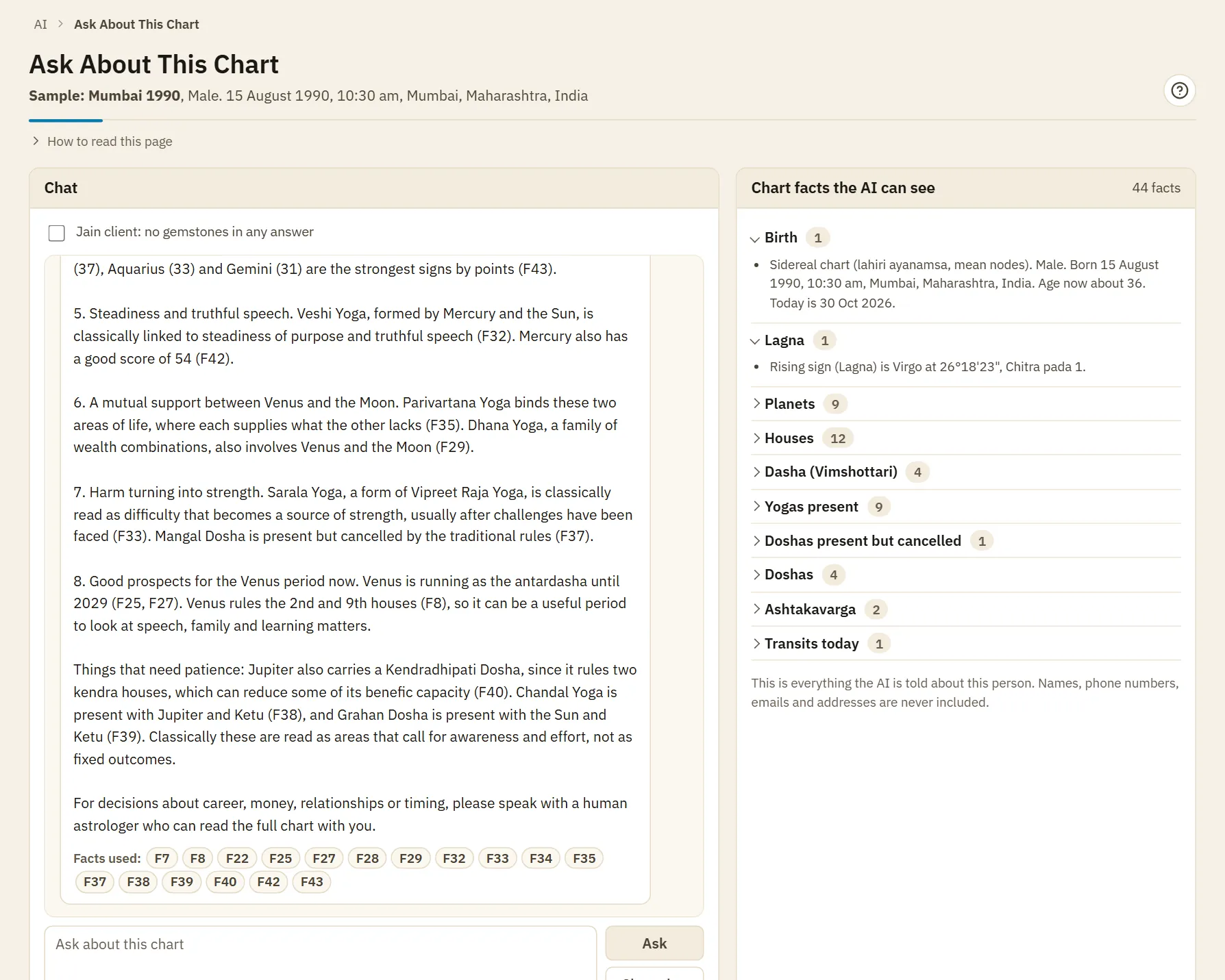
A draft with its facts
A real answer for a sample chart. Each point names the numbered chart facts it came from, and the list on the right is everything the AI was told. You read it, change it and decide what to tell your client.
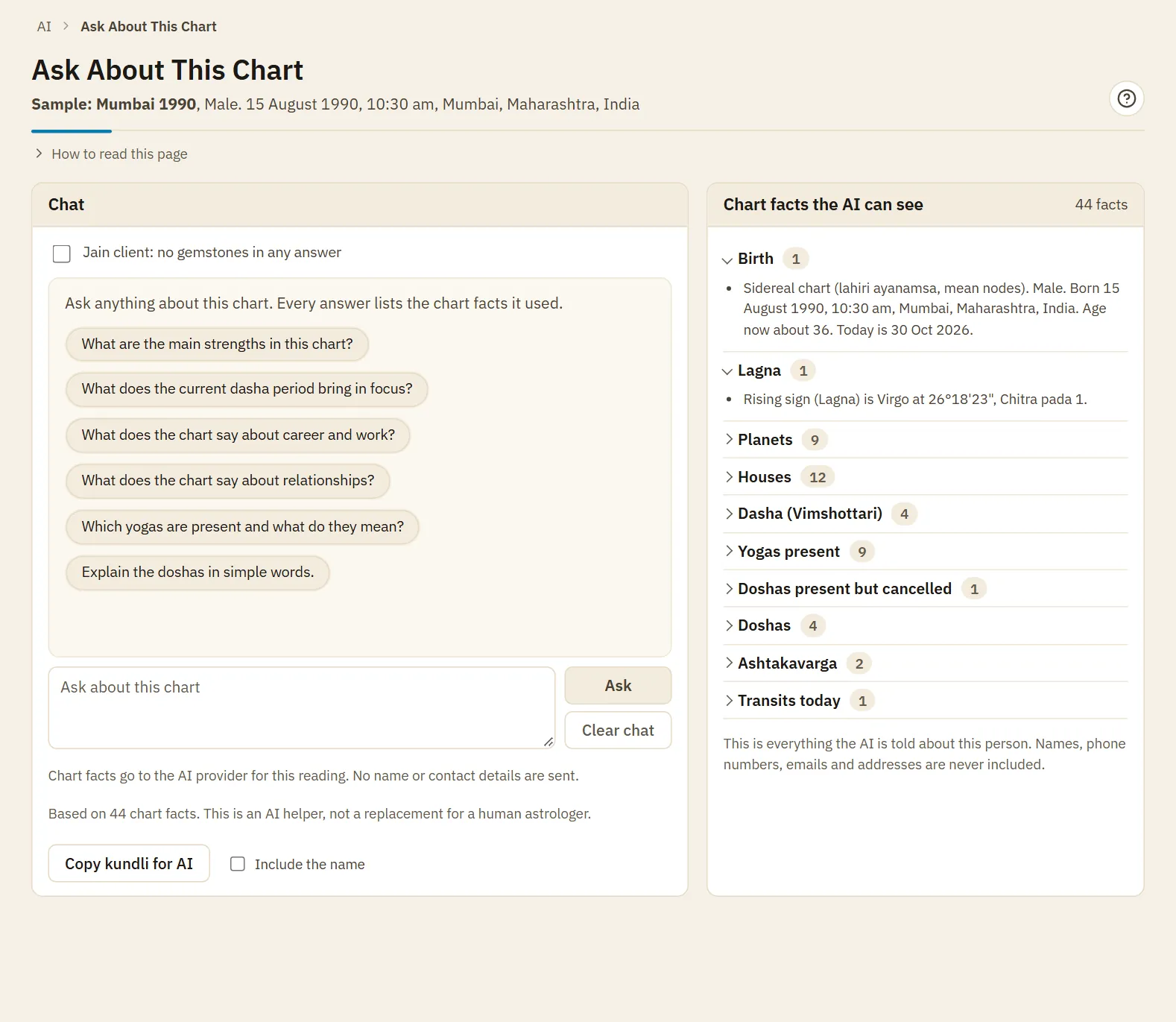
Ask About This Chart
The chat with its ready questions, and beside it every chart fact the AI may use for this person. This is everything it is told.
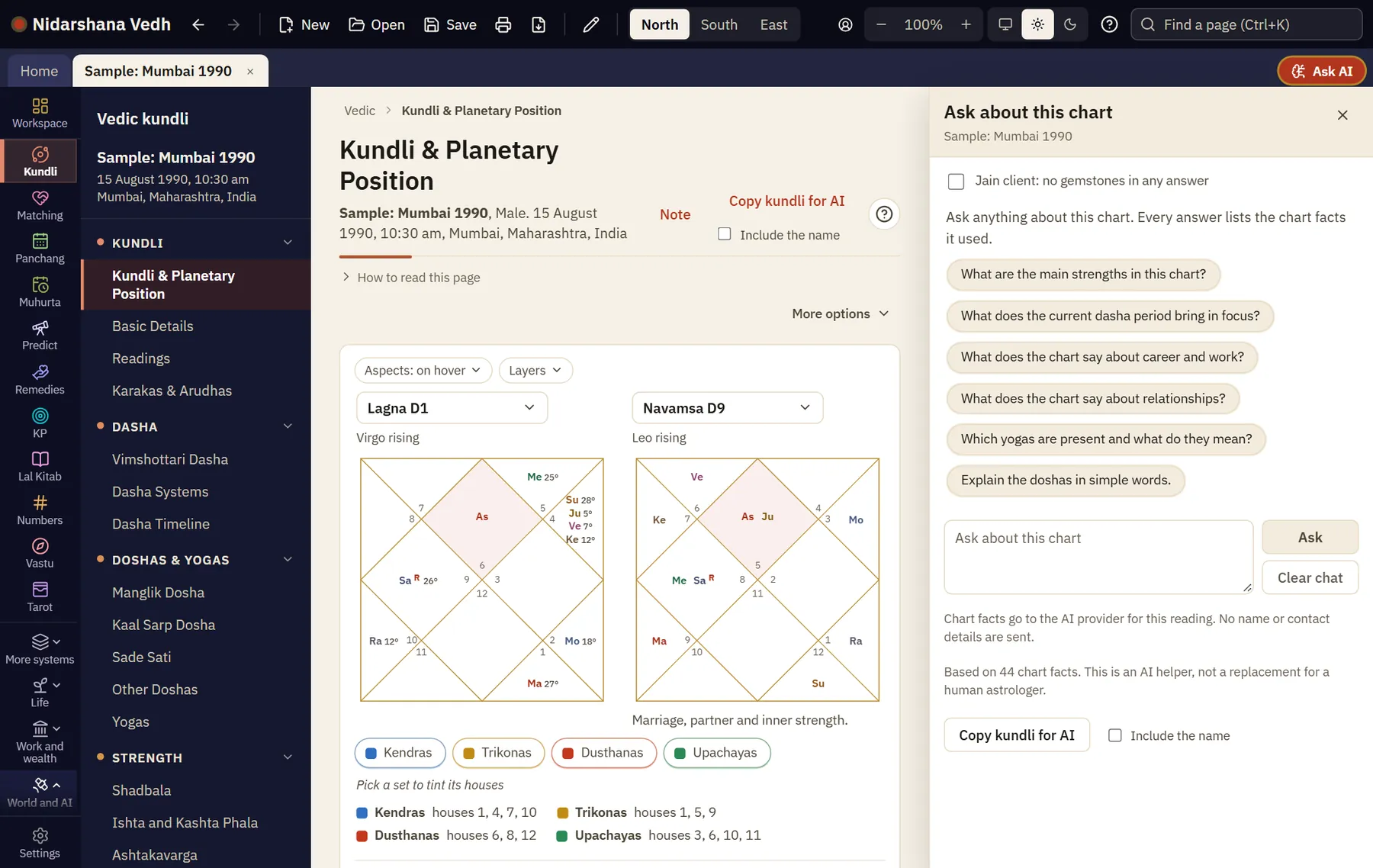
The Ask AI drawer
The same chat opens beside any kundli page, so the chart stays in view while you ask.
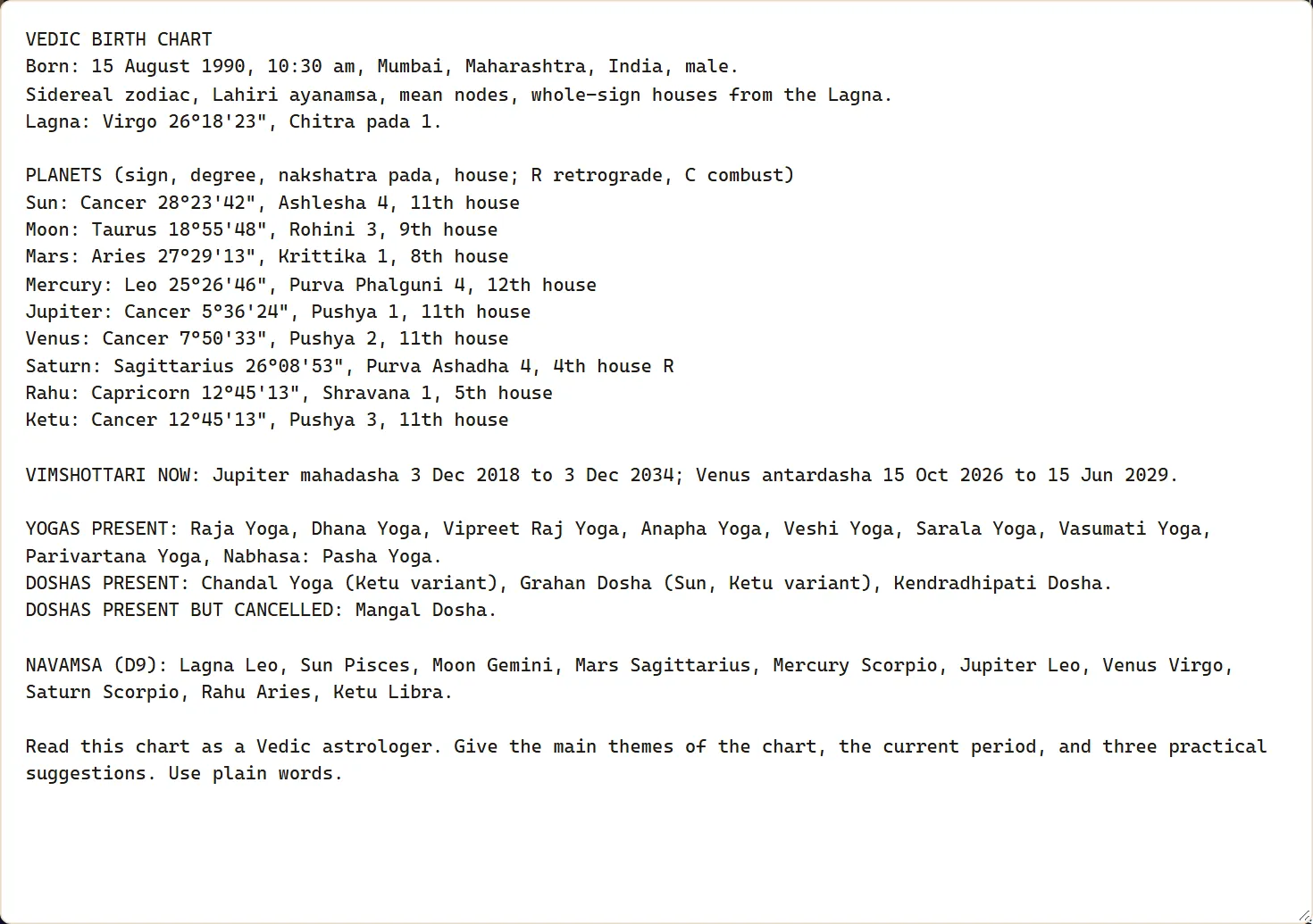
Copy kundli for AI
The plain text this button makes for a sample chart, ready to paste into any AI you use. The name is left out unless you ask for it.
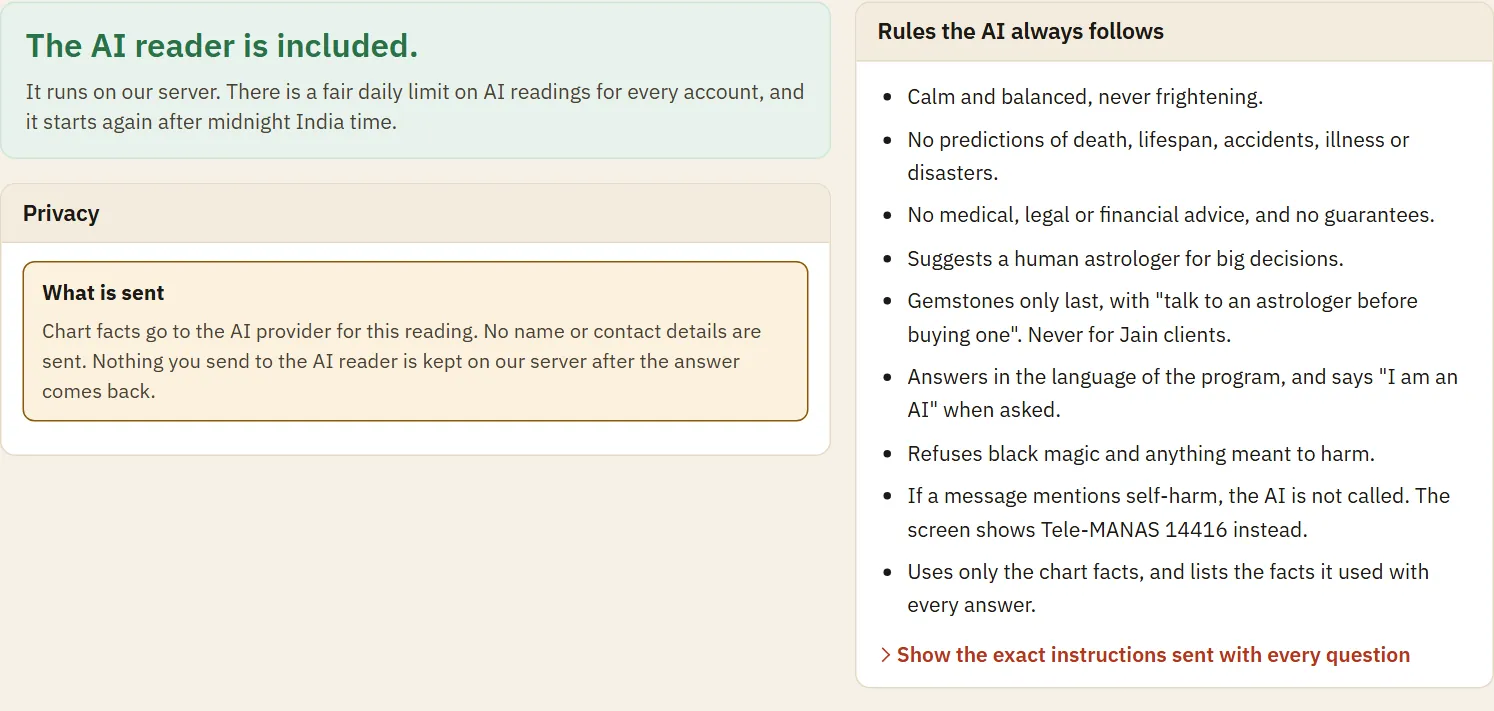
What is sent and the rules
This page says what goes to the AI reader and lists the rules it always follows. Open the last line to read the exact instructions.
How it fits a sitting
- Open the client's kundli and press Ask AI in the tab bar.
- Ask what the client asked, in your own words, or press one of the ready questions.
- Read the draft while the chart stays open. Open Facts used for any line you doubt.
- Speak to the client in your own judgement. Use what helps and leave the rest.
- After the sitting, open Full AI Reading and write the draft.
- Edit each part, save it to the client, and print the copy you are happy with.
Method and sources
The tool works out the chart first, then turns it into short numbered facts. The AI is told to use only those facts and to end each answer with the numbers it used. The same fixed safety instructions go with every request and cannot be switched off.
- Chart facts come from the tool's own calculations, with planet positions from NASA JPL DE440.
- The AI runs on our server and is included in the plan, so there is no key to add.
What it does not do
- It does not predict. It drafts from the facts it is given, and it can miss or misread one, so read every word before it reaches a client.
- It will not answer questions about death, lifespan, accidents or illness, and it refuses black magic and anything meant to harm.
- It cannot add what the tool did not work out. If a fact is missing, the answer will be thin.
- You cannot choose the AI model or use your own key. Every account has a fair daily limit, and the AI reader needs the internet.
Questions
What exactly goes to the AI?
The numbered chart facts, your question and the chat so far. The client's name, phone, email and address stay out. The one exception is the numerology tab, where the name you type is sent because the name number needs it.
Do I need my own AI account or key?
No. The AI reader is part of the plan and runs on our server. There is nothing to install or set up.
Can I print a draft as it comes?
The button is there, but a draft is only a first draft. Read it, check any line you doubt, and rewrite what sounds too sure. The printed page says that you reviewed it.
Why did it refuse my question?
Questions about death, lifespan, accidents or illness get a calm refusal, and so does anything meant to harm a person. Ask about character, work, relationships or the current period instead.
Are the chats saved?
No. A chat stays only while the tool is open, so nothing a client asked is kept after you close it. A written reading is saved only when you press Save to client, and it goes into your client records.
Can I use it for a Jain client?
Yes. Tick Jain client on the chat or the reading, and gemstones are left out. For a client already marked Jain in your records, the tick is on by itself.
Does it work for Tarot and Western charts too?
Yes. Tarot, numerology, palm and Vastu have their own tab, and Western pages send Western positions to the chat. The Western plan also has an AI client report with a review tick before printing.
Have another question?