Tarot reading software
A reading table for working tarot readers. Deal a fair spread or enter the cards from your own deck, read each card in its place with the source beside it, and keep every reading in the client's record.
Included in the Tarot plan, Rs 3,001 a month. No card needed. Sign in with Google to start.
Who it is for
Tarot readers who work with clients in person, on a video call or by message. A client can send you three numbers on WhatsApp. You count them out from your own pack, type the card names, and the reading goes on like any other.
Astrologers who also read cards, because a saved reading can be set beside the client's kundli. Students too, since the journal and the statistics are made for learning a deck over months.
What you can do with it
The reading table
- Three steps on one page: Ask, Read and Wrap up. A reading in progress stays on the table while you look at another page.
- 12 layouts: Single card, Three cards, Celtic Cross, Relationship, Career, Horseshoe, Year ahead, Twelve houses, Tree of Life, Two paths, Week ahead, and Yes or no.
- The Celtic Cross comes in two orders. A switch changes it between Waite's numbering of 1910 and the later numbering many readers learned.
- The place name sits under each card. Click a card and the side panel opens with Meaning, My note, Pairs and Timing.
- Shuffle here uses the secure random number generator of your browser, so no card is favoured. The table asks once if you read reversed cards, and you can change it any time.
- A Significator can be set before the deal: a court card you choose, one from the suit of the client's Sun sign, or a card for the matter. Waite's rule is quoted, and the card leaves the deck first.
- Draw a clarifier for any place. It sits under the spread and is saved with the reading.
- A strip under the table counts the Major cards, each suit and the reversed cards. When cards share a number or rank, a line says so and opens Waite's table of recurring cards.
- The Yes or no layout answers by a stated rule. Upright leans yes, reversed leans no, and the table says which side has more cards.
- Client view fills the screen with only the cards and the place names, for a second screen or a video call.
- A session timer and a notes log keep the time of each note you write during the sitting.
Reading from your own deck
- Choose My own deck, lay out your cards as you always do, and put each one in its place from the pictures.
- Or type all the names at once: 5 cups, queen of swords r, the tower. Short forms work too, such as 5c, qs and kn wands.
- The entry understands rods, coins and disks, the Thoth and Marseille names, and the Hindi card names. A name it cannot read is reported, not guessed.
- These readings are marked Own deck in your records, and the report says the computer did not choose the cards.
Card Library
- The 78 cards of the Smith-Waite deck of 1909, with large pictures. Filter by Major cards, suit, element or planet.
- Search looks through card names, Thoth and Marseille names, key words, and the words of Waite and Mathers.
- Each card has a plain-words meaning, upright and reversed. The reversed text is labelled Modern reading, with Waite's own reversed line beside it.
- Reader's view shows the old books' own words. Client view shows only the plain-words texts.
- Correspondences show who gives each one, and a label says when only one book gives it or the books disagree. The Golden Dawn title, the Sephirah and the time of year are here too.
- Keep your own notes on a card and your own yes or no mark, and print a one-page sheet of any card.
- The Pairs tab sets two cards side by side with the Golden Dawn rule for cards lying next to each other, and 59 written notes labelled as our own modern reading.
Client records and practice
- Readings lists every saved reading. Search it, filter it by client, date, spread, deck or tag, and sort any column.
- Open a reading to edit its notes, tags and follow-up date, print it, or put it back on the table.
- Tarot Record shows one client's readings in time order, the cards that come back, and the words that return in the questions.
- Follow-ups lists what is overdue, due today and due in the next 30 days. Mark one done, move it a week, or make it an appointment in the Workspace calendar.
- Practice Journal: draw a card of the day, write your reflection, and see the days you wrote on a calendar. Your own notes gather card by card.
- Statistics count the cards in your saved readings against what a fair shuffle gives. Click a bar to see the readings behind it.
- Spread Designer: drag up to 40 places on a grid, lay a card across, and name and explain each place. Start from a blank layout or a copy of a built-in one.
- Export a table of readings as CSV, and back up every reading and designed spread in one file.
Reports and the chart
- A branded report with your name, logo, contact details and colours, in English or Hindi. It shows the spread as it lay, each card in its place, your message and the sources.
- Print it or save it as a PDF. Each report you keep can be opened and printed again exactly as it was.
- A short text of the reading, with one line for each card, to copy into WhatsApp or a message.
- The AI reading tab drafts text with a footnote for every sentence. A sentence with no matching source is flagged, and only text you approve reaches the report.
- Card and Chart sets a saved reading beside the client's kundli: the dasha periods then and today, the Moon's transit, the planetary day and hour, and the personal year.
- The same page shows where each card's planet or sign sits in the chart, in the tropical zodiac with the Vedic sign beside it.
See it in the tool
Real screens from the tool, made with sample charts. Select a screen to see it larger.
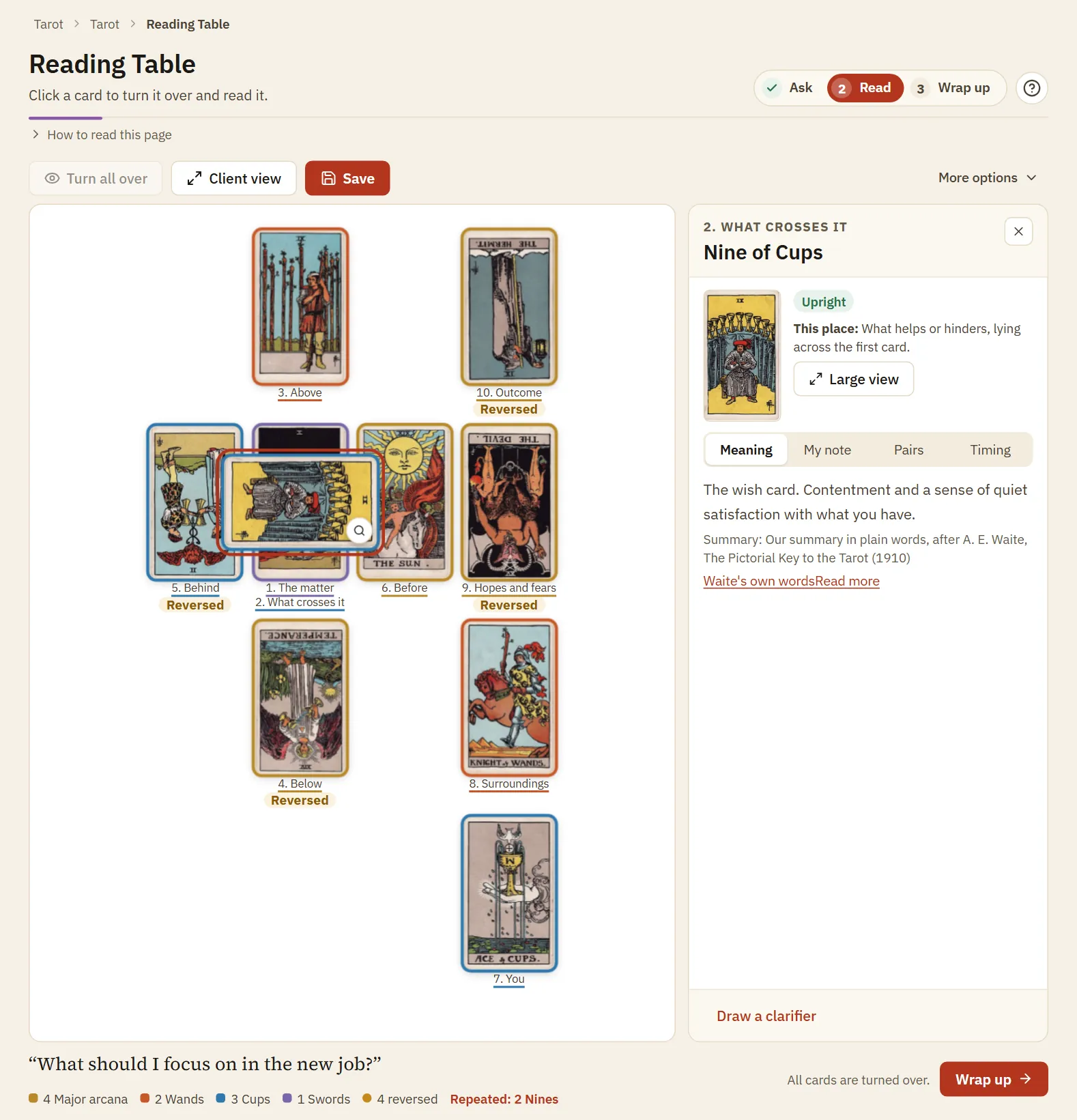
The reading table
A Celtic Cross turned face up. The side panel shows the card you clicked, what its place means, and the reading with its source.
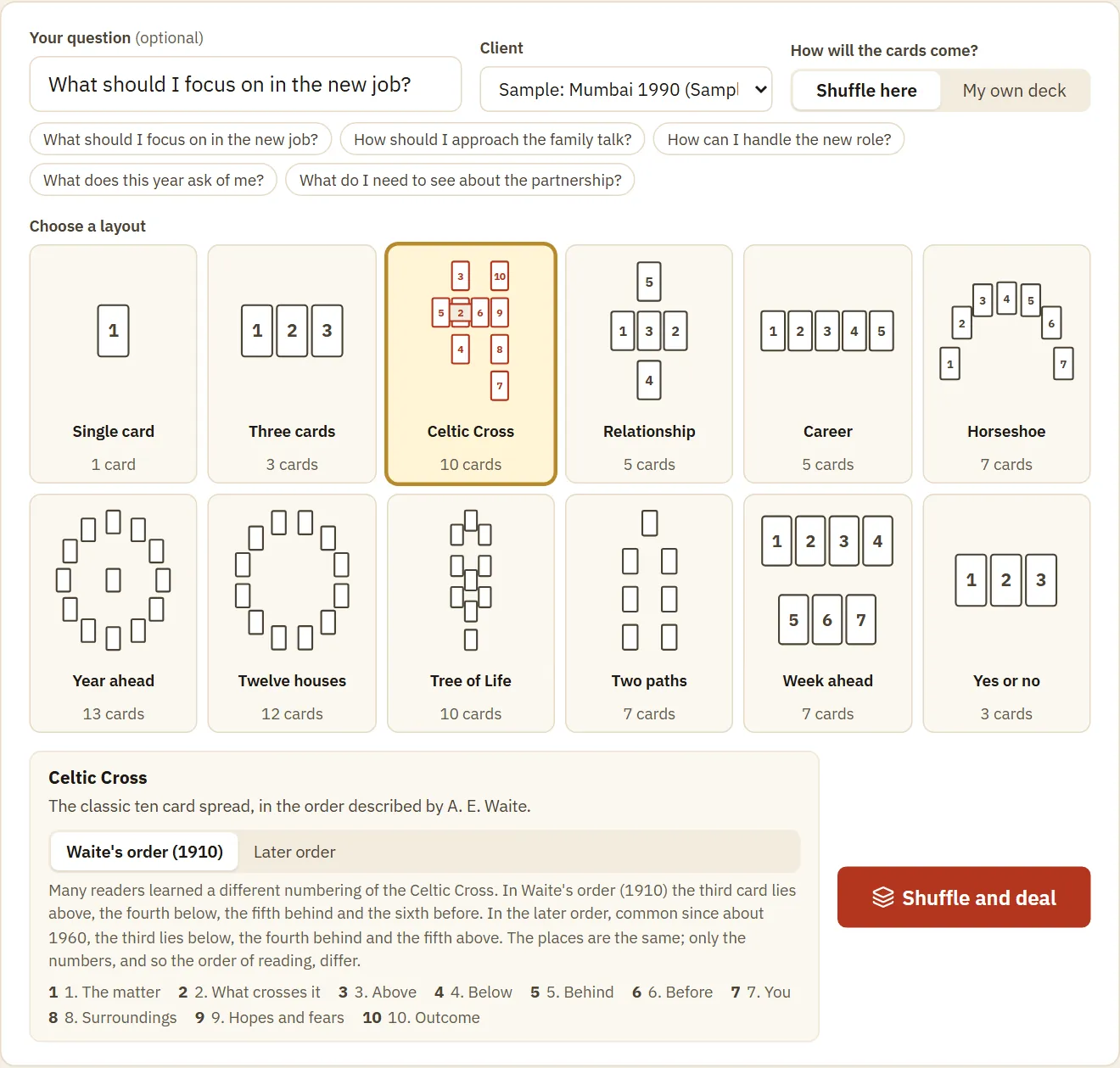
Asking the question
The first step holds the question, the client, how the cards will come, and the 12 layouts as small pictures. Earlier questions wait as one-click chips.
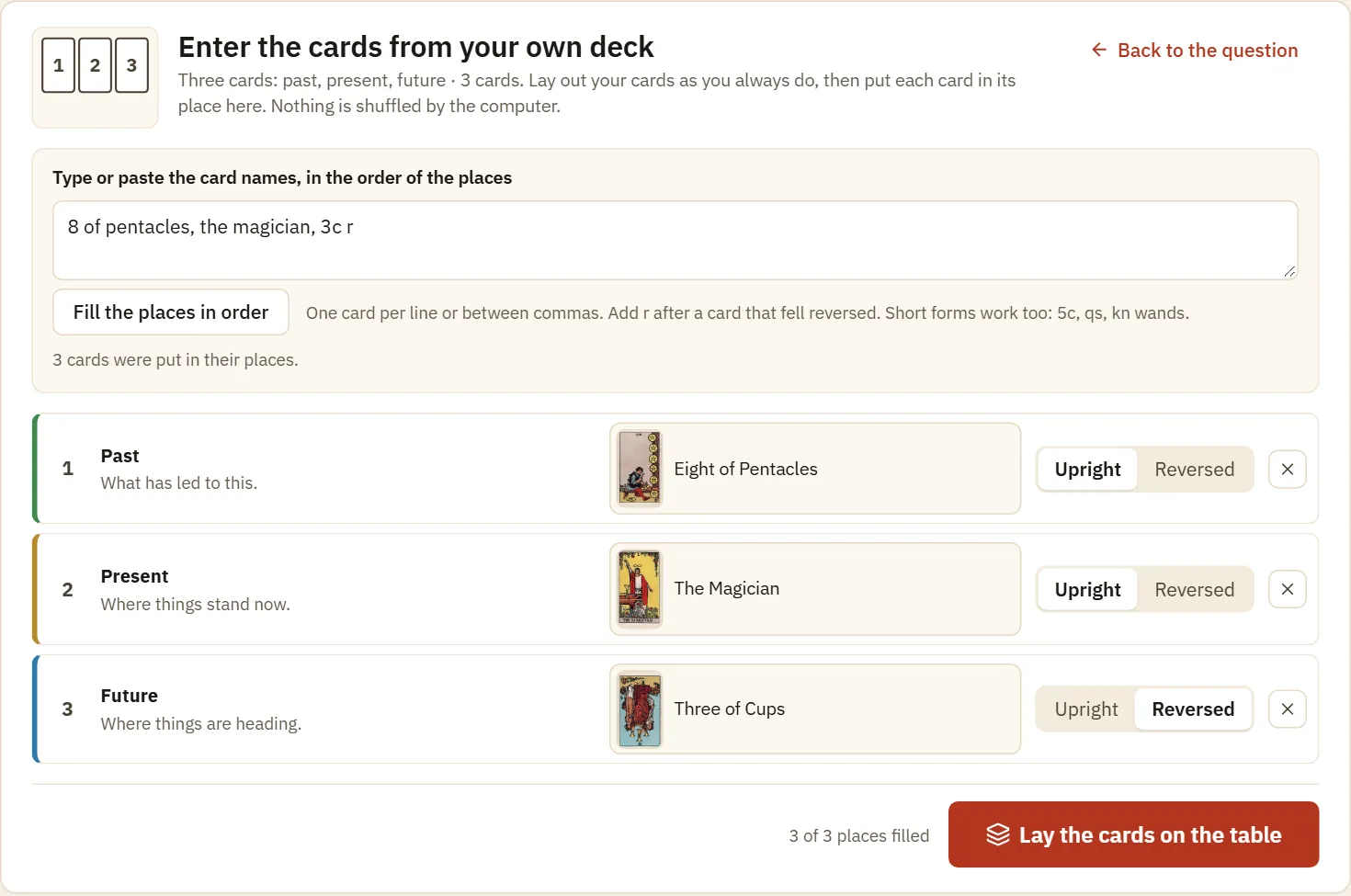
Entering your own deck
Typed card names fill the places in order. Here the r after 3c marks the Three of Cups as reversed.
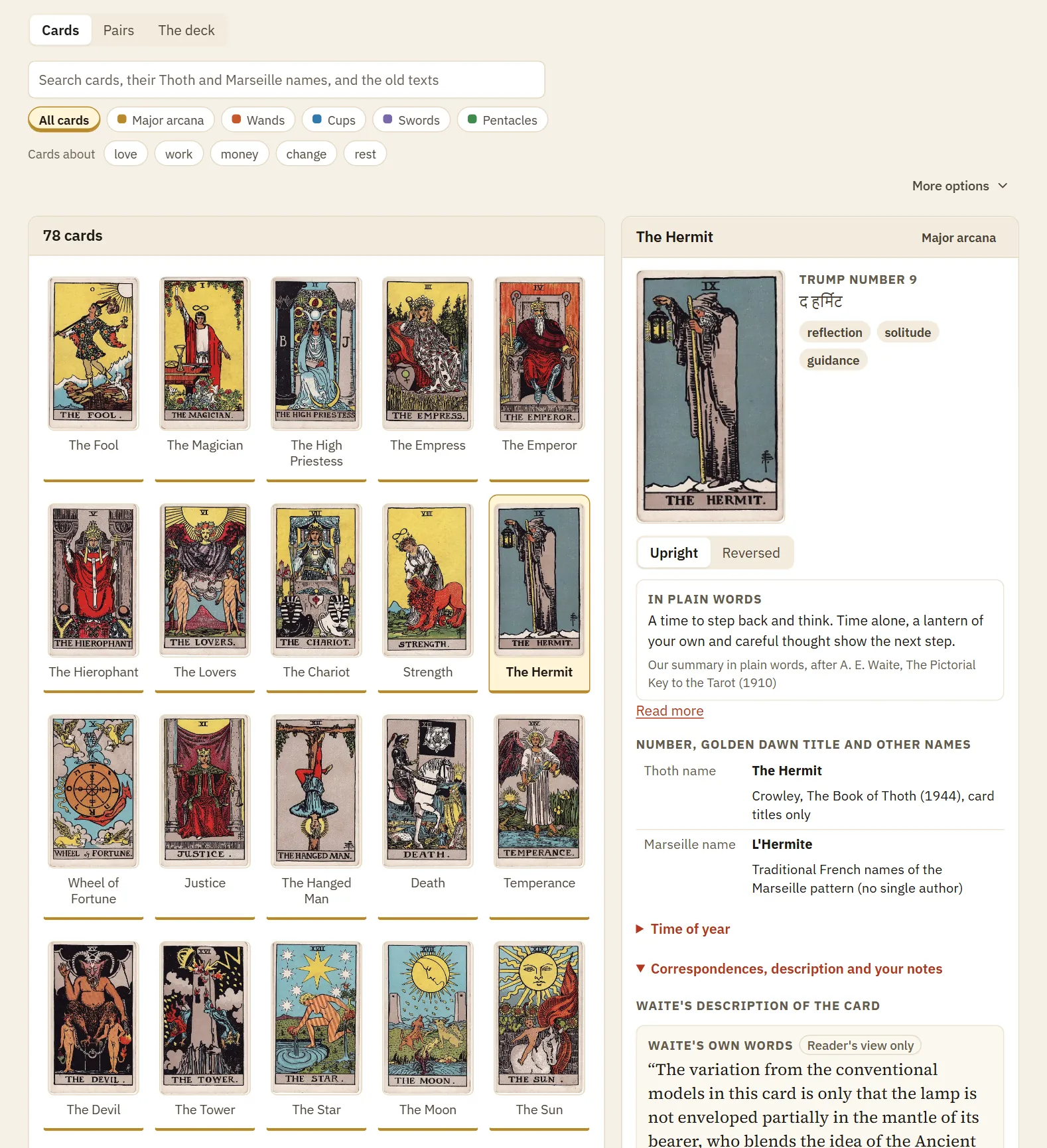
The Card Library
The 78 cards beside the panel of one card, with its plain-words meaning, its Thoth and Marseille names, and Waite's description for the reader.
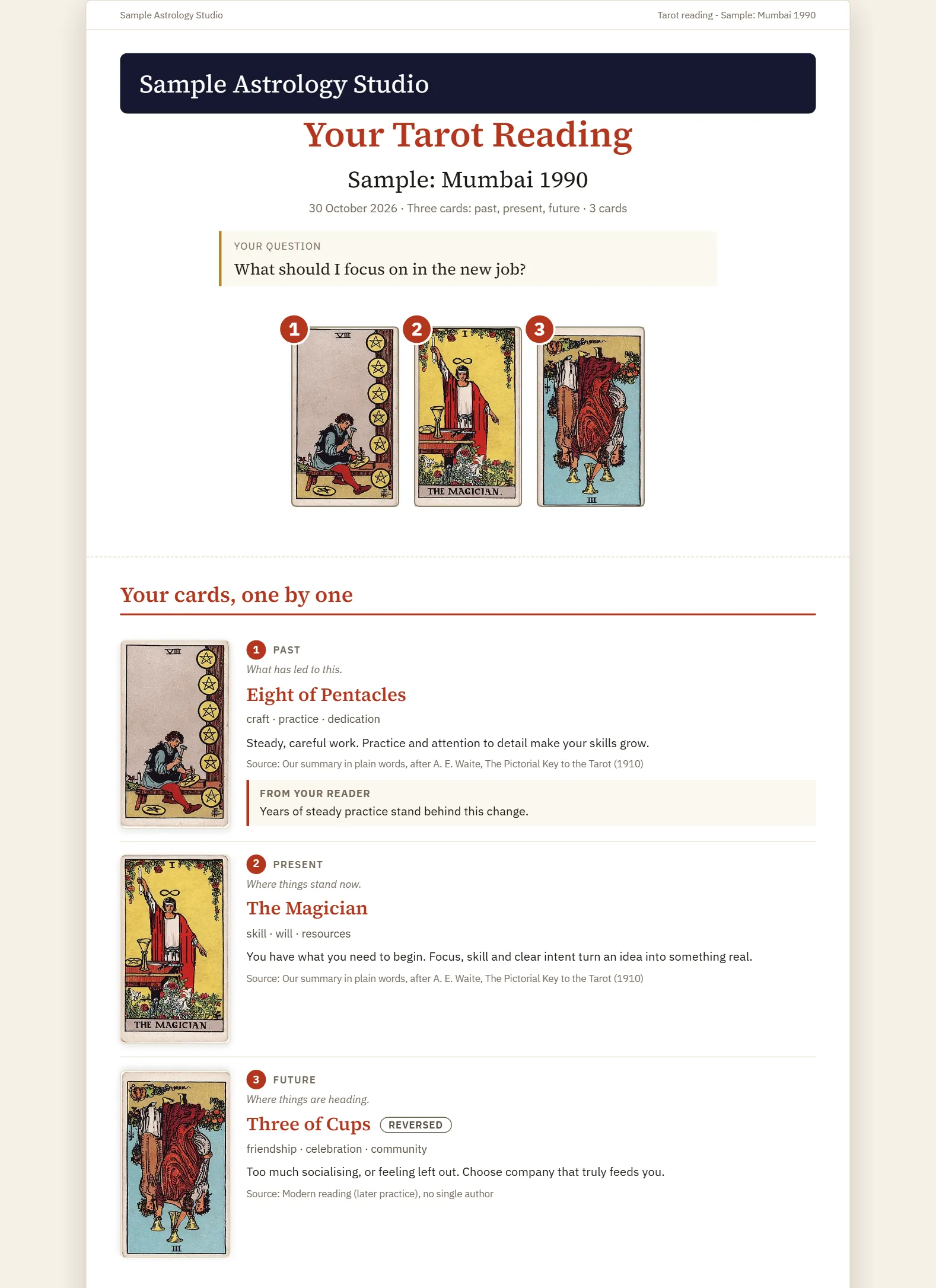
The client report
A report under a sample studio name. It shows the question, the spread as it lay, and each card with its meaning, source and your note.
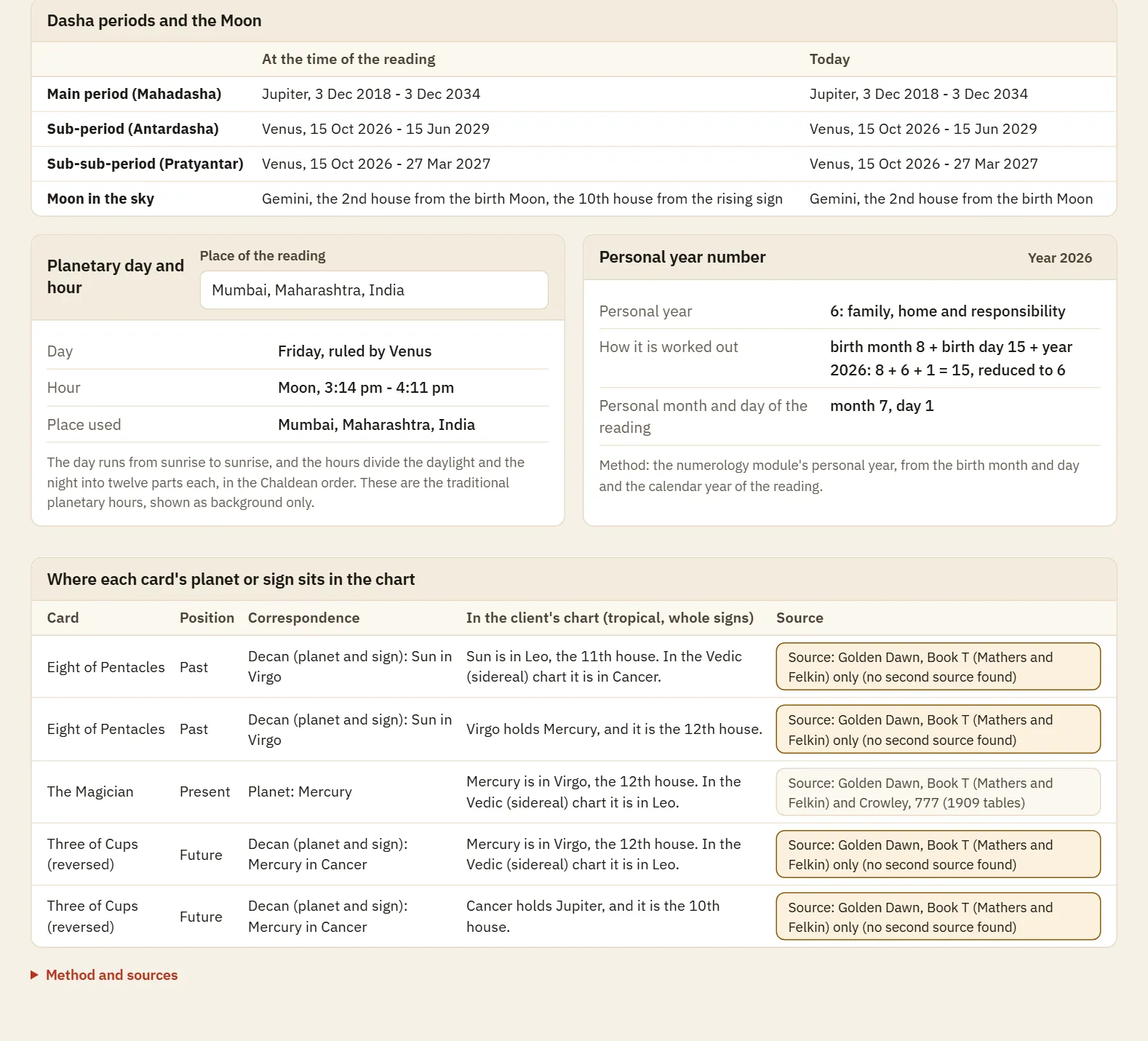
Card and Chart
A saved reading beside the client's kundli, with the dasha periods, the Moon, the planetary hour, the personal year, and where each card's planet sits in the chart.
How it fits a reading
- Choose the client and type the question. A question asked before is one click away.
- Pick a layout, then Shuffle here or My own deck.
- Turn the cards one by one. Read the place first, then the card, and open Client view if the client is watching on a screen.
- Write a note on any card, and draw a clarifier where you need one.
- In Wrap up, write a note on the whole reading and set a date to check back.
- Make the report, or copy the short text, and give it to the client from your own phone or mail.
Method and sources
The plain-words meanings are our own. The upright texts follow A. E. Waite, and the reversed texts are a modern reading, labelled so. Waite's and Mathers' own words sit beside them, each quote checked against the saved text of its book. Correspondences name the books that give them.
- A. E. Waite, The Pictorial Key to the Tarot (1910): descriptions, meanings, recurring cards, the Significator
- S. L. MacGregor Mathers, The Tarot (1888): a second voice on meanings
- Golden Dawn, Book T: titles, decans, court cards and the rule for cards side by side
- Aleister Crowley, 777 (1909 tables): a second source for letters and signs, and the path numbers
- Crowley, The Book of Thoth (1944): card names only
- Papus, The Tarot of the Bohemians (1892): numbers and Hebrew letters only
What it does not do
- One set of pictures comes with the tool, the Smith-Waite deck of 1909. Thoth and Marseille names are understood, but their pictures are not included, and a reading from your own deck is shown with the 1909 pictures.
- It does not predict. Timing gives a time of year from the old tables, never a date, and a yes or no reading is a lean by a stated rule.
- Old books give no yes or no value for a card, so none is shown except your own mark. The rule for cards side by side covers the four suits only, and the written notes cover 59 pairs, not every pair.
- It does not send anything for you. Save the PDF or copy the short text, then send it yourself. Readings are saved in your browser on your device, so back them up before you change devices.
Questions
Can I use my own physical deck?
Yes. Choose My own deck, lay out your cards, and enter them from the pictures or by typing their names. Statistics and follow-ups count these readings too.
Is the shuffle fair?
It uses the secure random number generator of your browser, with a method that gives each card the same chance. The deck is shuffled once and dealt from the top, so a card cannot come twice in one reading.
Do I have to read reversed cards?
No. The table remembers your answer. The Yes or no layout is the one exception, because its rule needs them.
I learned on the Thoth or Marseille deck. Will it work for me?
You can search and type those card names, and they lead to the matching card. The pictures and meanings shown are those of the 1909 deck, which many readers know as the Rider-Waite-Smith deck.
Does the AI write the reading for me?
It writes a draft from the cards of that reading and their sourced texts. You edit it and approve it, and a draft you have not approved stays out of the report.
Can I connect a tarot reading with a kundli?
Yes. Choose a client with a saved kundli at the table, and Card and Chart shows the running dasha, the Moon's transit and where each card's planet sits in the chart. It is background for you, not a prediction.
Have another question?